



Craft CMS 6.0.0-beta.1 is a prerelease. Craft says 6.0 is mostly feature-complete, after more than two years of work and a port to Laravel. It affects anyone planning an upgrade from Craft 5, and anyone who maintains a plugin.
Body
What the beta means
The first Craft 6 alpha was tagged six months before the beta, when the Laravel port was finished. Craft expects the beta to run for about four months, with the stable release planned for March. Until then the work is bug fixes, control panel polish and documentation.
Because it's a prerelease, we wouldn't run it on a production site. Try it on a copy of a project instead.
A rebuilt control panel
The control panel is now a Vue and Inertia app, with refreshed styling for buttons, form inputs, chips, status badges and Matrix blocks. A new Theme user preference offers Light, Dark and System, and System is the default (#19966). Flyout menus in the global nav open the sub-pages of sections you aren't in (#19648).
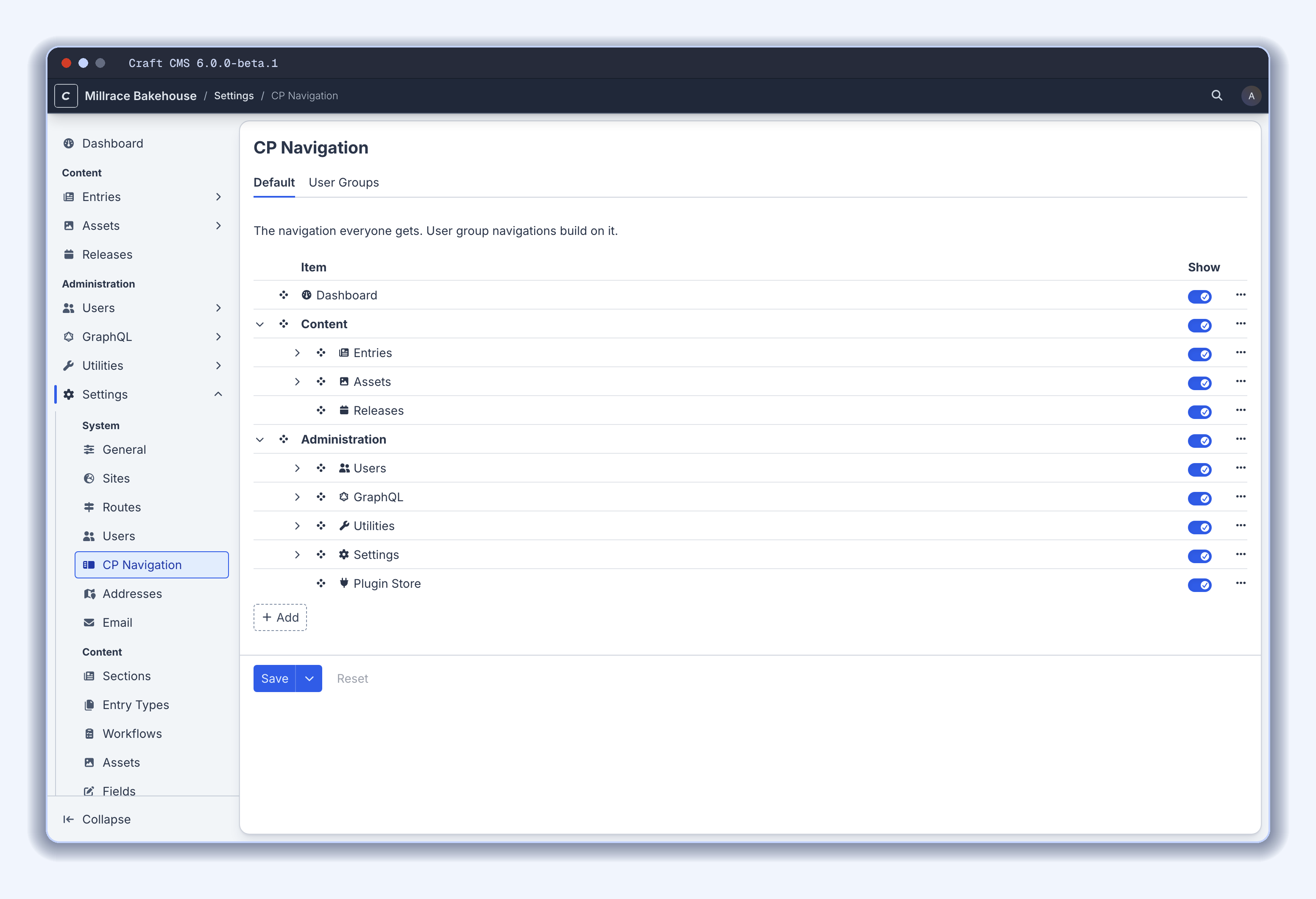
Administrators can reorder, rename, hide and add nav items from Settings → System → CP Navigation. On Craft Pro and Enterprise, user groups can have their own navigations that build on the default one (#20247).
Cover cards let a thumbnail fill the whole card, controlled by a new Thumb Style setting in card view designers (#20148). Slideouts and modals can now be resized (#19978, #20008), and a notification center has been added. The control panel also warns users a couple of minutes before their session expires, and lets them sign back in without leaving the page (#20086).
Icons moved to Font Awesome 7. Icons that version renamed, such as user-large and film-simple, no longer show under their old names. Check any you use, since this touches the values of Icon fields, the icons on entry types and options, and the icon names that plugins declare (#20520).
Command palette and Ask AI
Command/Ctrl + K opens a command palette. It finds fields, tabs and Matrix blocks on the current page, as well as control panel pages, entries, assets and users, and it searches the Craft documentation. It also runs actions such as creating entries, publishing releases and clearing caches, and each one is subject to the same permission checks as the corresponding screen (#20081).
Ask AI is a chat beside every control panel screen, opened with Command/Ctrl + I. It works through Craft's MCP tools as the signed-in user and proposes changes for you to review and apply to the form. Tools that change anything need the user's approval (#20109), and nothing is saved until the user says so.
AI features stay off until an administrator chooses a provider in Settings → Extend → Connections (#20006). Ask AI also needs the Use the AI assistant permission and a provider for the AI assistant task. Administrators can write guidance and skills for the assistant in the new AI Guidance & Skills utility (#20109).
Workflows, releases and Compare
Publishing workflows are configured in Settings → Workflows and assigned to sections. Drafts in those sections must be approved by each stage before they can be applied. They are available on Craft Pro and Enterprise only. The User Review stage type supports per-group approvals, change requests and email notifications, and drafts get a Workflow tab (#19667).
Releases group saved drafts so they can be scheduled and published together, atomically.
The new Compare screen puts two versions next to each other: a draft against the current entry, two revisions, unsaved changes against the saved entry, or the entry in two sites. Two separate entries can be compared from an element index (#20384). Fields also get Copy value and Paste value actions (#20449). The Copy value from site field action is gone, replaced by Compare (#20384).
Assets
Images that look like copies of ones already uploaded, even resized or recompressed, wait in their upload notification, where you can cancel, keep both or replace (#20113). Images keep embedded metadata such as title, alt text, creator, camera and location, and asset indexes can show it in new columns and card attributes. Once an AI provider is set up, Craft is able to generate alt text and titles, tag and classify images, and detect focal points (#20103).
Volumes have a new Propagation Method setting, and assets are saved to the site they were uploaded from (#20060). The trashedAssetDisk config setting lets soft-deleted assets be restored (#20093).
Craft-managed filesystems are removed. Volumes now point to Laravel filesystem disks in config/filesystems.php, and existing references are migrated automatically (#19650). On a site upgraded from Craft 5, transforms go to the volume's own disk, unless the volume's asset_transformer sets output_disk, and the transform index is cleared so transforms are generated again on request.
Built on Laravel
Routing, authentication, sessions, mail, migrations and maintenance mode now go through Laravel. Blade views can be loaded from Twig templates (#19148). An app's own Eloquent models can be managed as elements in the control panel, with no change to the models or their tables (#19971). Section and Matrix site settings get a single Route To setting that accepts templates, named Laravel routes and controller actions (#19762). Authenticated and public MCP servers are enabled and given endpoints in Settings → MCP (#19846), and SQLite databases are supported (#18803).
Some changes can break existing projects:
- Logging out needs a CSRF-protected POST request (#19252).
- Base site URLs follow addTrailingSlashesToUrls, so they no longer end with a trailing slash by default (#19723).
- Strings passed to orderBy(), select() and groupBy() are quoted as column names, so other SQL expressions need expression() in Twig or DB::raw() in PHP (#20190).
- The routes.php config file is no longer supported.
Categories, global sets and tags are deprecated (#18009).
Upgrading and plugins
Craft points existing Craft 5 sites to the craft6-revamp tool and the upgrade guide. An optional Yii2 adapter keeps Craft 5's Yii-based APIs working, so plugins, modules and config can be updated gradually. The Plugin Store flags plugins that need the adapter and installs it with them. The adapter registers a Yii2 Loose Ends utility that lists what still depends on it (#20501).
Craft says most of its first-party plugins already support Craft 5 and 6 in their current versions, with Craft 6-only major versions to follow.
On our tracker, the CKEditor plugin by craftcms is In progress, with a 6.x-dev release that requires craftcms/cms ^6.0.0-beta.1. The CKEditor plugin by batchnz shows No release yet. Both statuses are dated 6 November 2026. They describe what the developers have released, not what we've tested.
Craft 5 keeps receiving security updates until March 2032, so there's no deadline pushing you to upgrade.
What to do next
Try the beta on a non-production copy of a project, check any icons and query strings the breaking changes touch, and report bugs on GitHub. Plugin maintainers can find Craft's plugin development resources linked from the announcement.
Everything else in this release
The rest of the changelog, with a link to each change.
Control Panel
- Links to fields, such as those in Ask AI’s replies, now open the tab or details panel the field is in. ( (#20109)
- Readable text, such as Ask AI’s replies, now styles ordered lists, task lists, blockquotes, and inline code. ( (#20109)
- Modified fields on drafts and revisions now have a “Compare changes” action, which shows how the field’s value differs from the current entry or the previous revision. Matrix fields that show their entries as cards or in an index show them as cards, with the edited and new ones marked, and each card can be opened in a new tab. (#8135, (#20307)
- Element cards whose header has no label, such as asset cards, now show just their checkbox and action button over the card, without a header bar, and cards whose header has nothing in it no longer show one at all. Entry cards keep their header bar, with their entry type’s label and icon. ( (#20148)
- Plain links to control panel pages, such as those in elements’ metadata and other server-rendered HTML, now open with Inertia rather than reloading the page. ( (#20118)
- Sortable checkbox selects, such as “Card Attributes”, “Table Columns”, and “Default Table Columns”, now list only the selected options, with an “Add item” menu for the rest. ( (#20001)
- Slideouts’ details panes that were folded away for lack of room now reopen once the slideout is wide enough again. ( (#19978)
- The global nav now groups Entries and Assets under a “Content” heading, and Users, GraphQL, Utilities, Settings, and Plugin Store under an “Administration” heading. ( (#19903)
- Dates are now shown in the calendar of the user’s formatting locale, such as the Persian calendar for Persian or the Buddhist calendar for Thai. Named and ICU date formats in Twig, such as |date('short'), follow the site locale’s calendar too. (#8741, (#20085)
- Element editor slideouts now have the full Save menu, including “Save and continue editing”, as well as an action menu and an “Open in a new tab” button. ( (#19748)
- Pressing Ctrl/Command + Return in a text input or textarea now submits its form. ( (#20025)
- Control panel text is now drawn with grayscale antialiasing on macOS, figures in tables and times line up in columns, shadows have a cool tint that matches the interface, and keyboard shortcuts share one keycap style. ( (#20544)
- Refreshed the control panel’s styling, including modals, buttons, form inputs, editable tables, chips, Matrix blocks, status badges, and file and folder icons. ( (#19942)
- “Pending” statuses are now blue rather than orange, and “Edited” badges and modified-field indicators are now violet rather than blue. ( (#20258)
- Link and Email field values in element indexes and cards now stay on one line, cut off with an ellipsis, after a button that shows the full address with options to open or copy it. Hovering over the link shows the same details. ( (#20123)
- The “View Mode” (Matrix, relation, Addresses, and Content Block fields), “Thumb Style”, “Section Type”, and image transforms’ “Mode” settings now show their options as joined, illustrated buttons, with each option’s label inside the button, below its illustration, and the selected option’s illustration drawn in blue. When there isn’t room for them in one row, they wrap as separate buttons. ( (#20233)
- Dashboard widgets, such as Recent Entries and My Drafts, now update when elements are saved, in the same browser tab or another one. ( (#20485)
- Fixed a bug where date pickers within slideouts could open far away from their inputs at some browser zoom and display scaling levels. ( (#20399)
Elements
- Element index searches now update results as users type. ( (#19754)
- Clicking anywhere on an element index table row or card (other than an interactive control) now selects it. ( (#19351)
- Element index selections now carry across pages, and bulk actions apply to all of them. Selections are cleared when the search, status, filters, source, or site change. (#10295, (#20262)
- Selecting every result on an element index page now shows a banner under the header that offers to select all of the index’s results, on every page. Bulk actions apply to them all, other than any deselected afterwards. The page controls now stay in the element index footer while elements are selected. (#10295, #11833, (#20262)
- Bulk element actions on more than 100 elements now run from a queue job. Actions that can’t, such as downloads and duplicating with descendants, are hidden once more than 100 elements are selected. (#11833, (#20262)
- Element index View menus now have a “Thumb Size” setting in table, structure, and thumbnail views, with “Small”, “Medium”, and “Large” options, plus “XL” and “2XL” in thumbnail view. Each view remembers its own size, and chips take a size to suit their thumbnails. (#20083, (#20124)
- Element indexes now show placeholders while their results load, rather than a spinner. Placeholders match the view mode and thumbnail size the results will be shown at, and the source’s card thumbnail style and alignment, so results no longer show at the default thumbnail size before switching to the chosen one. ( (#20199)
- Thumbnail views in element indexes and relational fields now show each element as a chip, with its thumbnail above its label. (#20083, (#20124)
- Element edit pages now have a “Sites” pane in their details sidebars on multi-site installs, in place of the “Status” pane. It lists the sites the element is saved to, with status toggles and links to the element in each site, and lets authors add the element to other sites, or remove it from them. Element editor slideouts can be switched to other sites from it. ( (#20061)
- Deleting an element for the only site it exists in now soft-deletes it, unless it’s a draft or nested element. ( (#20060)
- Element editor slideouts now have a “Preview” button, which opens Live Preview with the slideout’s editor beside the preview. (#14298, (#19964)
- Live Preview no longer flickers when it reloads. The updated page loads behind the current one and is swapped in once it’s ready, keeping the scroll position. ( (#19964)
- Live Preview now fades between device sizes, rather than re-laying out the previewed page throughout the animation. ( (#19964)
- Live Preview now reloads once after a run of quick edits, rather than after every autosave. ( (#19964)
- Field values submitted for nested entries, Content Block fields, and addresses are now ignored if the user isn’t permitted to see or edit the fields, per their field layout conditions. ( (#20391)
- Fixed an error that occurred when editing an address within a draft, if the owner element wasn’t saved in the primary site. ( (#20413)
- United Kingdom administrative areas (counties) now come from commerceguys/addressing, and are stored by their ISO codes rather than their names. Existing UK addresses are migrated automatically, and Administrative Area condition rules that reference county names are normalized to the new codes. ( (#19488)
Entries
- Added support for disabling Matrix entries for individual sites. ( (#19686)
- Added the “Show the Post Date field” and “Show the Expiry Date field” entry type settings. Single and nested entries now have Post Date and Expiry Date fields too, unless their entry type hides them. ( (#17675)
- Collapsed Matrix blocks are now remembered per site, like their enabled status. ( (#20119)
- “New entry” buttons now only offer the entry types and sections that CraftCms\Cms\Entry\Events\EntryTypesResolving listeners leave available for the site, instead of ones that then fail with a 400 error. ( (#20322)
Assets
- Assets in more than one site can be compared between sites from the Sites panel, on the Compare screen, where field values can be copied from one site to the other. ( (#20384)
- Added Undo/Redo support and a “Revert to original” button to the image editor. ( (#19600)
- The image editor now asks for confirmation in a dialog before discarding unsaved changes when it’s closed or reset to the original. ( (#20466)
- Image thumbnails and previews in the control panel now show a blurred placeholder based on the image’s colors while they load. ( (#19750)
- Asset previews now have “Download” and “Close” buttons, and text file previews have a “Copy” button. Image previews’ focal point toggle is now a “Focal Point” toggle button beside them, rather than a button laid over the image that only appeared on hover. ( (#20229)
- Images uploaded straight to a remote filesystem, such as an S3 bucket, are no longer downloaded to be sampled, and uploads staged on an S3 disk are copied into their volume within S3 when the disks share credentials and an endpoint. ( (#20103)
- Asset conditions, such as for index filters and Assets fields’ sources, now have an “Orientation” rule, which filters images by whether they’re landscape, portrait, or square. Images whose width and height differ by up to 2% count as square. ( (#20114)
- Assets fields’ selector modals now list Temporary Uploads after the field’s restricted location, including when it’s a subfolder. ( (#20521)
- Added the uploadSessionDisk config setting, which determines the disk used to stage upload sessions. ( (#19650)
- Renamed the tempAssetUploadFs config setting to tempAssetUploadDisk, which now references a Laravel filesystem disk. ( (#19650)
- Image assets now have BlurHash strings, available via asset.blurhash in templates. ( (#19755)
- tags returned by asset.getImg() now have a blurred placeholder as their background, unless the image has transparent regions. ( (#19750)
- Added the blurhash, analysis, and placeholderDataUrl fields to assets in GraphQL queries. analysis holds what was found in an image, such as its colors, embedded metadata, and type. ( (#19740)
- Images can now be queried by orientation via the orientation asset query param and GraphQL argument, and image assets’ orientations are available via asset.orientation in templates and the orientation GraphQL field. ( (#20114)
Users & Auth
- Users can now connect their accounts to one or more Laravel Socialite providers, which are listed on the login page. ( (#19202)
- Added the authGuard and authPasswordBroker config settings, allowing Craft authentication to use a dedicated Laravel guard, provider, and password broker. ( (#19598)
- The My Account → Tokens screen is now only shown to admins when OAuth signing keys haven’t been set up yet, and explains how to set them up, rather than failing with a server error when a token is created. Requests to create tokens are rejected with a 400 error until the keys are set up. ( (#20357)
- Fixed a bug where revoking the last token or authorized app on the My Account → Tokens screen led to a 403 error when the screen was no longer available, such as when GraphQL was disabled. ( (#20531)
- Fixed a bug where password reset and email verification URLs generated from the console, such as with users/password-reset-url, always pointed to the front end, even for users with control panel access. ( (#16340)
Conditions
- Added support for nested condition groups. ( (#19587)
Fields & Field Layouts
- Added sidebar field layout tabs, whose fields are shown in element edit forms’ details sidebar. ( (#20005)
- Field layout tabs can now have icons. ( (#20005)
- Added a new core Markdown field type. ( (#18960)
- Added a “Selectable {Type} Condition” setting to Link and Markdown fields’ Entry and Asset link types. ( (#19622)
- Added a “Default Row Values” setting to Table fields. ( (#3621)
- Table fields now have a “Link” column type, with the same settings as Link fields. Link cells return CraftCms\Cms\Field\Data\LinkData objects, and Table fields now track the elements they link to. (#16009, (#19998)
- Table field column settings now open in a slideout. ( (#19998)
- Table cell validation errors now name the column. ( (#19998)
- Table columns with invalid settings are now flagged in the Table field’s settings, and link setting validation errors in Link, Markdown, and Table fields now name the setting. ( (#19998)
- Field layouts with a card view designer now show it and the content tab designer in “Content” and “Appearance” tabs, with Generated Fields in the Content tab. ( (#20001)
- Generated fields and entry title formats now show dates in their site’s locale, the way element cards show them, when their template outputs a date directly, such as {postDate} or a Date field’s {startDate}. Entry types’ UI label formats now show those dates the same way, in the user’s locale. Filters still get the date, so {startDate|date('Y')} works as before. Generated fields are now also rendered in their site’s language, like entry title formats. ( (#20467)
- Entry types’ Icon and Color settings are now in their field layout designer’s Appearance tab, above Card Attributes. ( (#20001)
- Card view designers’ previews now reflect the owner’s color, icon, and name, such as an entry type’s, as they’re edited. ( (#20001)
- Entry type and user group descriptions, fields’ default instructions, tips, and warnings, and field layout elements’ instructions, tips, and warnings now have Markdown inputs. ( (#20001)
- Removed the “Show unpermitted entries” setting from Entries, Link, and Markdown fields, in favor of the “Viewable” condition rule in the “Selectable Entries Condition” setting. ( (#19611)
- Removed the “Show unpermitted files” and “Allowed File Types” settings from Assets, Link, and Markdown fields, in favor of “Viewable” and “File Type” condition rules in the “Selectable Assets Condition” setting. ( (#19611)
- Card view designers’ “Thumbnail Source” setting is now “Thumb Sources”, where several fields can be chosen and ordered. Chips and cards show the thumbnail from the first one that has one. (#20156, (#20181)
- Entry types with an icon can now use it as a thumb source, by choosing “Entry type icon” in their “Thumb Sources” setting. The icon is shown faintly, in the entry type’s color if it has one, and sits beside the card’s content even when “Thumb Style” is set to “Cover”. (#20208, (#20227)
- Custom fields now have “Default Tip” and “Default Warning” settings. ( (#19976)
- Copied elements are now put on the system clipboard as their titles, and links to their URLs in apps that take rich text, like copied relational field values. The “Copied” notification now matches copied field values’, with the elements’ chips side by side, and copying elements replaces a copied field value, and the reverse. Pressing Ctrl/Command + V within a relational or nested element field that can take the copied elements pastes them, as long as the clipboard still holds what was copied. ( (#20449)
- Relational fields now have a “Thumb Size” setting, like element index View menus, with “Small”, “Medium”, and “Large” options for the List and Inline list view modes, plus “XL” and “2XL” for the Thumbs view mode. ( (#20257)
- Read-only Markdown fields’ values can now be focused, selected, and scrolled, rather than being disabled. ( (#20109)
- With the Yii adapter installed, email is still sent through the mail transport adapter saved in the project config, including ones provided by plugins such as Mailgun and Postmark, until a Laravel mailer is selected in Settings → Email, set with MAIL_MAILER, or made the default in config/mail.php. It’s available as the craft-transport mailer, and is listed in the Yii2 Loose Ends utility while it’s in use. ( (#20502)
- With the Yii adapter installed, Craft::$app->mailer now sends email from the sender in Settings → Email by default, rather than Laravel’s mail.from config. ( (#20504)
Accessibility
- Links to other sites now show an external-link icon and tell screen readers that they open in a new window. ( (#20306)
- Improved the accessibility of the control panel, including element indexes, element edit screens, and the login page. ( (#19025)
- Menu buttons without text or a label, such as the arrow half of split Save buttons on plugin screens, are now named “More actions” for screen readers. ( (#20576)
- Error summaries now receive focus when a form fails validation, and each error links to its field, switching tabs if needed. ( (#20044)
- The current user’s own First Name and Last Name fields, and the Full Name, First Name, Last Name, and Organization fields of their own addresses, now have autocomplete tokens, so browsers and password managers can fill them in. ( (#20407)
AI
- The AI assistant can now see the image of an asset open in the editor, when its model supports vision. ( (#20109)
- Added command palette actions for creating, editing, and deleting AI skills, for users who can use the AI Guidance & Skills utility. ( (#20109)
- Added the “Analyze images” asset action, and an “Analyze images” option to the Asset Indexes utility and index-assets commands, which queue images to be analyzed. ( (#20103)
- Alternative Text fields now have a “Generate alt text” action, which fills in suggested alt text for editors to review before saving. ( (#20103)
- Assets can now be filtered by what kind of image they are, as found by the “Classify images” AI task, with the “Image Type” asset condition rule. ( (#20103)
MCP
- Added the mcp:read, mcp:write, and mcp:admin OAuth scopes for the authenticated MCP server. Users choose an access level when they authorize an MCP client, and it defaults to read only. ( (#20080)
- MCP clients that users have authorized are listed on their My Account → Tokens screen, where they can be revoked. ( (#20291)
- The OAuth authorization page now shows where the user will be redirected, and can no longer be displayed in a frame. ( (#20105)
- The OAuth authorization page now names the client in its title, and shows the host the user will be redirected to. ( (#20296)
- Names of dynamically-registered OAuth clients are now limited to 64 characters, with invisible, private-use, and unassigned characters removed, and names that look like “Craft”, “Craft CMS”, the system name, or a site name are rejected. ( (#20296)
- Dynamic OAuth client registration is now limited to 10 clients per IP address per hour, via the oauth-registration rate limiter. ( (#20303)
- Garbage collection now deletes expired and revoked OAuth authorization codes and tokens, and registered OAuth clients that were revoked or never authorized. ( (#20303)
- The HTTP MCP servers are discoverable via /.well-known/ai-catalog.json and a Server Card at /server-card, per SEP-2127. Servers on control panel URLs are never advertised, and the authenticated server is only advertised when public registration is enabled. Discovery requests are subject to the defaultRateLimit config setting. ( (#20283)
- Added the mcp:serve command, which serves the authenticated MCP server over stdio as a named user. ( (#19846)
- Added the guidance_get, skills_list, and skills_get MCP tools, which return the AI guidance and skills. ( (#20109)
- Added the guidance_update, skills_create, skills_update, and skills_delete MCP tools, which save the AI guidance for the sites the user can edit and manage skills, for users who can use the AI Guidance & Skills utility. ( (#20109)
- Added the guidance_update_personal MCP tool, which saves the user’s own AI guidance. ( (#20109)
- The MCP server’s elements_field_schema tool now says that Markdown fields take Markdown, rather than HTML. ( (#20109)
- The elements_* MCP tools no longer list draft, revision, or structure criteria and attributes for element types that don’t support them, such as structure params for assets and users. ( (#20254)
- MCP tools that set Matrix field values now add new entries after the existing ones when sortOrder is omitted, and reject a sortOrder that doesn’t list every new entry. ( (#20292)
- MCP tools now accept times of day for Time fields within nested entries, and reject times they can’t parse. ( (#20319)
- MCP tool input schemas now declare the items of relatedTo and notRelatedTo element query criteria, so strict MCP clients such as VS Code accept the search_query tool. ( (#20329)
- The MCP server’s configuration tools can now manage control panel navigations, via the cp-navigations configuration type, which reads and writes each navigation as the tree the navigation builder edits. ( (#20247)
- Added the user_permissions_user_update and user_permissions_group_update MCP tools, which add and remove specific permissions without resending complete lists. ( (#20437)
- The configuration_get, configuration_list, configuration_create, and configuration_update MCP tools now return each record’s revision, and configuration_update and configuration_delete accept it as expectedRevision, failing without changing anything if the record has changed since it was read. Without expectedRevision, they can still overwrite changes made since the read. ( (#20438)
- The assets_upload_prepare MCP tool is now available over stdio. Its uploads go to action URLs on APP_URL, authorized by a token returned for each upload, so stdio clients can upload files the server can’t read, such as files on the host of a container it runs in. ( (#20493)
- The configuration_update MCP tool accepts field settings in the form that configuration_get returns them, such as Matrix fields’ entry types. ( (#20406)
- MCP clients can now sign in when the control panel has its own domain and no cpTrigger. ( (#20353)
- MCP fields arguments accept dot paths, such as blocks.innerBlocks, which include nested fields of nested elements as {type, id, status} summaries. ( (#20415)
- MCP tools return users’ addresses when addresses is included in fields. ( (#20415)
- The elements_list, drafts_list, revisions_list, search_query, and craft_query MCP tools return all non-nested custom fields when fields is null. ( (#20463)
- The asset_folders_list MCP tool accepts null for criteria.parentId, which lists volumes’ root folders. ( (#20464)
- The authenticated MCP server returns an OAuth challenge to requests without an access token when OAuth signing keys haven’t been set up, so MCP clients can tell that it requires signing in, and Settings → MCP explains how to set up the keys. ( (#20455)
General
- Added support for Markdown-based custom Dashboard widgets in the application's resources/widgets/ directory. ( (#19319)
- Added support for configuring the system time zone during installation. ( (#18794)
- Added the autoEagerLoadElements config setting (true by default), which determines whether element queries should be automatically lazy eager-loaded. ( (#19637)
- Added the compiledTemplatesPath config setting. ( (#18861)
- Added the defaultRateLimit and defaultRateLimitDuration config settings, which configure the rate limits for login, password reset, and two-step verification requests. ( (#20054)
- Terminal commands shown in the control panel and console output for the current environment now use the local development environment’s wrappers: ddev craft and ddev composer in DDEV, and valet php craft and valet composer for Laravel Valet sites isolated to a PHP version. This includes the Plugin Store’s installation instructions, which no longer have separate “Shell” and “DDEV” tabs, and the OAuth signing key instructions on the Settings → MCP and My Account → Tokens screens. ( (#20492)
- The “Assets” settings nav item is now listed under “Content”, and “Globals”, “Categories”, and “Tags” are now listed under a new “Deprecated” heading, if those concepts are supported for the project. ( (#19670)
- The System Messages utility now shows each message in a card, and edits messages in a slideout with a Markdown editor. Typing {{ in a message’s subject or body suggests the Twig variables it can use. ( (#19946)
Routing & URLs
- Routes outside the craft middleware group can now use Route::allowDuringMaintenance() to stay reachable during maintenance mode. ( (#20095)
Templates
- Craft now registers several Blade directives, bringing near feature parity with Twig templating. ( (#19148)
- Improved Twig attribute access on Eloquent models to resolve missing and null attributes, casts, accessors, and relations through Eloquent property access, while preserving explicit method calls. ( (#20165)
- Reference tags now support fallback values when no attribute is specified. ( (#17688)
- Added the craftCommand() Twig function, which returns a Craft console command as it should be run for the current environment, such as ddev craft. ( (#20492)
- Elements no longer include custom field values when iterated over. ( (#19004)
- Added the {% render %} Twig tag. {% render %} tags and render() methods are allowed within the Twig sandbox. ( (#19988)
- Templates can now choose white or black text for legibility over an image or one of its edges, with asset.analysis.colors.textColor(), which also gives the text’s contrast ratio. ( (#20103)
GraphQL
- GraphQL schemas can now include read-only components for sites, sections, entry types, volumes, and user groups, which add site fields to elements, volume fields to assets, and groups fields to users. ( (#20055)
- The GraphQL API now accepts Passport access tokens with the graphql:read or graphql:write scope, from personal access tokens created on My Account → Tokens or OAuth clients that users authorize. Requests made with them can query and change only the content that the token’s user has permission to access, and graphql:read tokens can’t run mutations. ( (#20231)
- OAuth clients can discover and register for the GraphQL API on their own, and users choose “Read only” or “Read and write” access when they authorize one. ( (#20231)
- Added the currentUser GraphQL query, which returns the user that authenticated the request with an access token. ( (#20231)
- The level GraphQL argument is now a [QueryArgument], so it accepts the same values as the level element query param, such as ">= 2" or [1, 2]. Queries that pass it from an Int variable must declare the variable as [QueryArgument]. ( (#20209)
- Address queries in GraphQL now accept the addressLine1, addressLine2, addressLine3, dependentLocality, field, fieldId, firstName, fullName, lastName, locality, organization, organizationTaxId, postalCode, primaryOwnerId, and sortingCode arguments, like the matching address query params. ( (#20251)
- Added the canonicalId, canonicalUid, draftId, draftName, draftNotes, fieldId, isDraft, isUnpublishedDraft, ownerId, and sortOrder fields to addresses, and the sortOrder field to content blocks, in GraphQL queries. ( (#20251)
- Element query argument descriptions in GraphQL, and the elements_* MCP tools’ query criteria descriptions, now name the element type, such as “the entries’ statuses”, rather than referring to “elements”. ( (#20250)
- GraphQL mutations now return an error when new Matrix entries aren’t listed in sortOrder, rather than ignoring them, and each Matrix entry input can only specify one entry type. ( (#19965)
- Authenticated GraphQL requests now respect field layout conditions. Fields that are hidden from the user are excluded from the schema, or resolve to null when their conditions are element-specific. Fields the user can’t edit are excluded from mutation arguments, or result in an error when set if their conditions are element-specific. ( (#20391)
Debugging
- Removed support for the Debug Toolbar. Laravel Debugbar can be used instead. ( (#18812)
- Added “Elements” and “Deprecations” panels to Laravel Debugbar. ( (#18897)
Deprecations
- Deprecated the errorTemplatePrefix general config setting. Error templates now go in an errors/ folder within the site templates, such as errors/404.twig, errors/_404.twig, or errors/404.blade.php, with errors/offline and errors/error as fallbacks, and a site’s own template folder takes precedence, such as resources/views/siteHandle/errors/404.twig. ( (#20448)
- Deprecated the csrfTokenName, enableCsrfCookie, and enableCsrfProtection general config settings. ( (#18806)
- Deprecated asset.setTransform(). asset.transform() should be used instead. With the Yii adapter installed, setTransform() still works on assets returned by Assets fields and asset queries, but the transform only applies to the asset’s URL, not its width, height, or getImg() output. ( (#20191)
System
- The database table prefix is now set with the DB_PREFIX environment variable. When craftcms/yii2-adapter is installed, Craft 5’s CRAFT_DB_TABLE_PREFIX and DB_TABLE_PREFIX environment variables are still applied, with a trailing underscore. ( (#20192)
- Image assets now store color data sampled from their file when it’s uploaded, replaced, or indexed, including the image’s dominant color, a grid of the average colors of its regions, its main colors and how much of the image each covers, and how light its regions are. Control panel uploads sample it in the browser. ( (#19740)
- Control panel resources are now provided by a craftcms/cms-assets package. ( (#19162)
- Two-factor authentication recovery codes are now encrypted at rest. ( (#19252)
- MySQL database backups and restores now carry over SSL/TLS settings from the system’s MySQL option files, if the database connection doesn’t have any PDO::MYSQL_ATTR_SSL_* attributes set, and respect the PDO::MYSQL_ATTR_SSL_CAPATH and PDO::MYSQL_ATTR_SSL_CIPHER attributes. ( (#19366)
- Fixed a bug where multi-instance fields’ search keywords were indexed per field rather than per instance, so searching by one instance’s handle could match other instances’ values. ( (#13991)
- Garbage collection now always re-enables foreign key checks, even if it doesn’t finish. ( (#20386)
- Fixed a bug where the PostgreSQL password could be included in the error message when a database backup or restore command failed. ( (#20503)
Sources
- Release 6.0.0-beta.1 · craftcms/cms · read 13 Nov 2026
- Craft 6 Beta Released | Craft CMS · read 13 Nov 2026
- CKEditor on the craft/news tracker · read 13 Nov 2026
- CKEditor on the craft/news tracker · read 13 Nov 2026
Daniel Jones
Editor at craft/news